The software engineering landscape is undergoing a monumental paradigm shift. For years, developers have relied on AI extensions that offer basic inline code autocompletion or linear chat interfaces. However, these tools still require the human developer to act as the primary driver, copying, pasting, and manually executing every step.
All of that changed with the unveiling of Google Antigravity. Originally announced as an experimental public preview, Google completely transformed the development ecosystem at Google I/O 2026 by launching the Antigravity 2.0 desktop application.
Far from being just another code assistant, Google Antigravity is an "agent-first" Integrated Development Environment (IDE) built from the ground up to orchestrate teams of autonomous AI agents. Powered natively by the blistering speed of the new Gemini 3.5 Flash Antigravity configuration, this ecosystem allows software engineers to step away from line-by-line coding and step into the role of a software architect.
In this comprehensive technical guide, we will break down exactly what Google Antigravity is, dive deep into the newly released Antigravity 2.0 desktop application, compare its dual-pane architecture, and explore how it utilizes autonomous AI agents software development practices to achieve unprecedented engineering throughput.
What is Google Antigravity?
At its core, Google Antigravity is an artificial intelligence-powered integrated development environment developed by Google. While it shares a recognizable foundation—forking the open-source Visual Studio Code (VS Code) ecosystem—its internal architecture is fundamentally different. Instead of prioritizing text entry, Antigravity prioritizes agent management.
Traditional AI coding extensions operate synchronously. You ask a question, you wait for a response, and then you apply the patch. Google Antigravity introduces an entirely asynchronous, parallel workflow.
It acts as a "Mission Control" center. Instead of micro-managing a single prompt, a developer can dispatch multiple specialized AI sub-agents into a workspace simultaneously. While one agent refactors a legacy authentication module, a second agent can autonomously generate a comprehensive unit test suite, and a third can crawl the web to find a fix for a broken dependency.
This highly autonomous operational capacity is exactly why tech analysts refer to Antigravity as the definitive agent-first coding tool of 2026.
The Powerhouse Engine: Gemini 3.5 Flash
An agent-first platform is only as capable as the large language model driving its reasoning loops. Google Antigravity achieved a massive performance breakthrough by establishing Gemini 3.5 Flash Antigravity integration as the system's default processing tier.
Don't let the "Flash" designation mislead you. In the past, lightweight models were fast but struggled with complex structural logic. Google's researchers have optimized Gemini 3.5 Flash specifically for long-horizon agentic loops, allowing it to lead global leaderboards.
Benchmark Dominance
On challenging coding and autonomous engineering evaluations, Gemini 3.5 Flash running inside the Antigravity harness routinely outperforms larger legacy models:
- Terminal-Bench 2.1 AI benchmark: Secures a dominant 76.2% success rate for CLI-driven execution.
- GDPval-AA: Reaches a commanding 1656 Elo in agentic consistency.
- MCP Atlas: Achieves 83.6% in multi-step tool utilization.
- CharXiv Reasoning: Leads multimodal processing at 84.2%.
Unprecedented Processing Speed
Because agentic workflows run continuous loops of planning, code execution, observation, and refinement, low latency is critical. Natively, Gemini 3.5 Flash is 4x faster than competing frontier models. However, when running inside Google Antigravity, bespoke hardware-software co-optimization accelerates inference speeds up to 12x faster during specialized tasks.
To prove the sheer potency of this architecture, Google demonstrated Antigravity 2.0 utilizing 93 concurrent AI sub-agents to build a completely functional operating system framework from scratch. The entire operation took just 12 hours, consumed 2.6 billion tokens, and cost under $1,000 in compute expenditures.
Dual-Pane Architecture: Editor View vs. Manager View
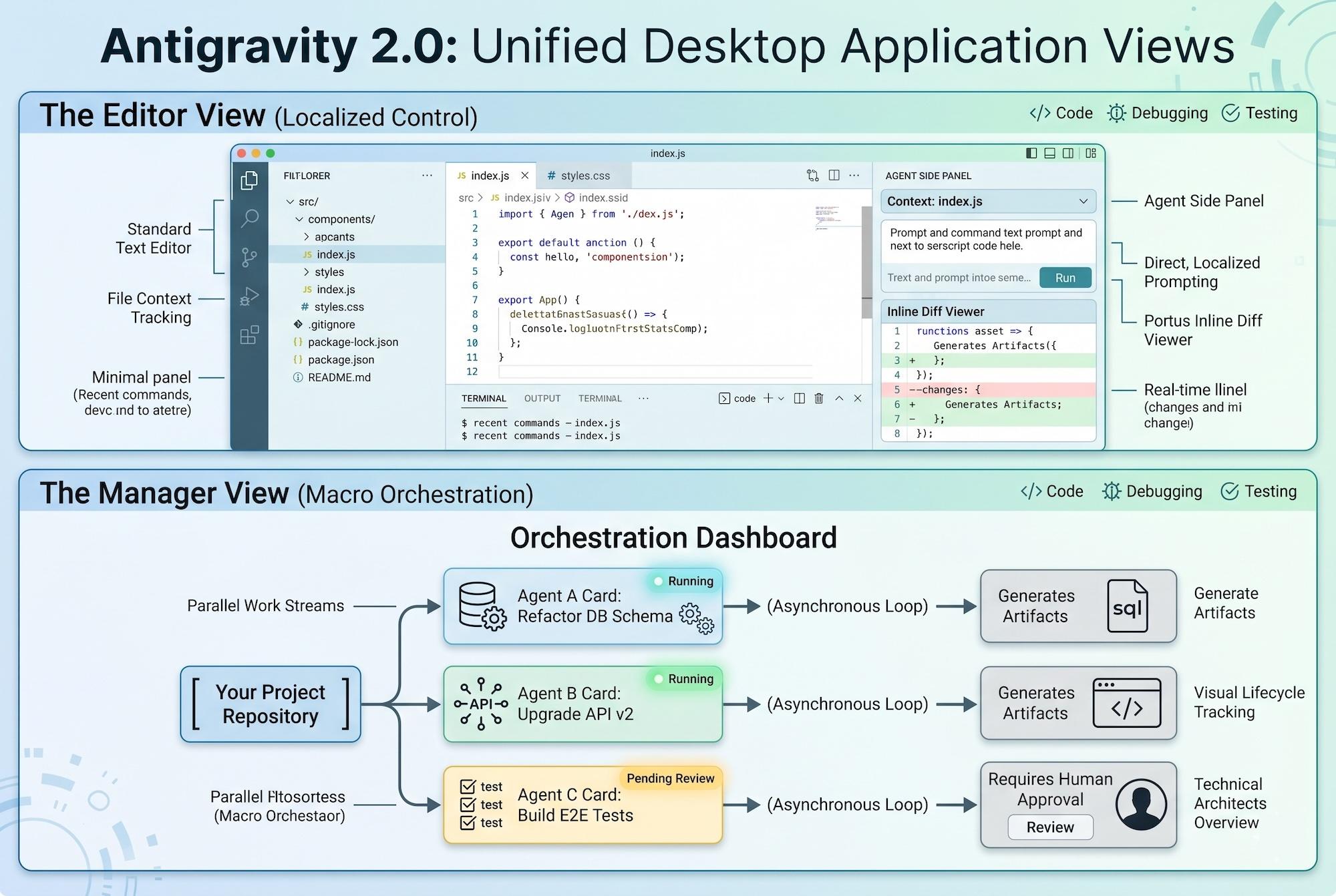
When launching the standalone Antigravity 2.0 desktop application, developers are greeted by a radically modernized interface split into two primary operational environments. Navigating between the Antigravity Manager view vs Editor view is fundamental to maximizing your productivity.
1. The Editor View
The Editor View provides a highly familiar interface for anyone who has used VS Code or Cursor. It contains your standard file tree, a tabbed text editor, and a terminal footprint.
However, flanking the traditional code window is a powerful Agent Side Panel. This panel tracks the immediate file context, provides space for direct, localized prompting, and displays real-time inline diffs as an agent actively modifies your script. It is the perfect view for localized styling, quick debugging, or standard script adjustments.
2. The Manager View
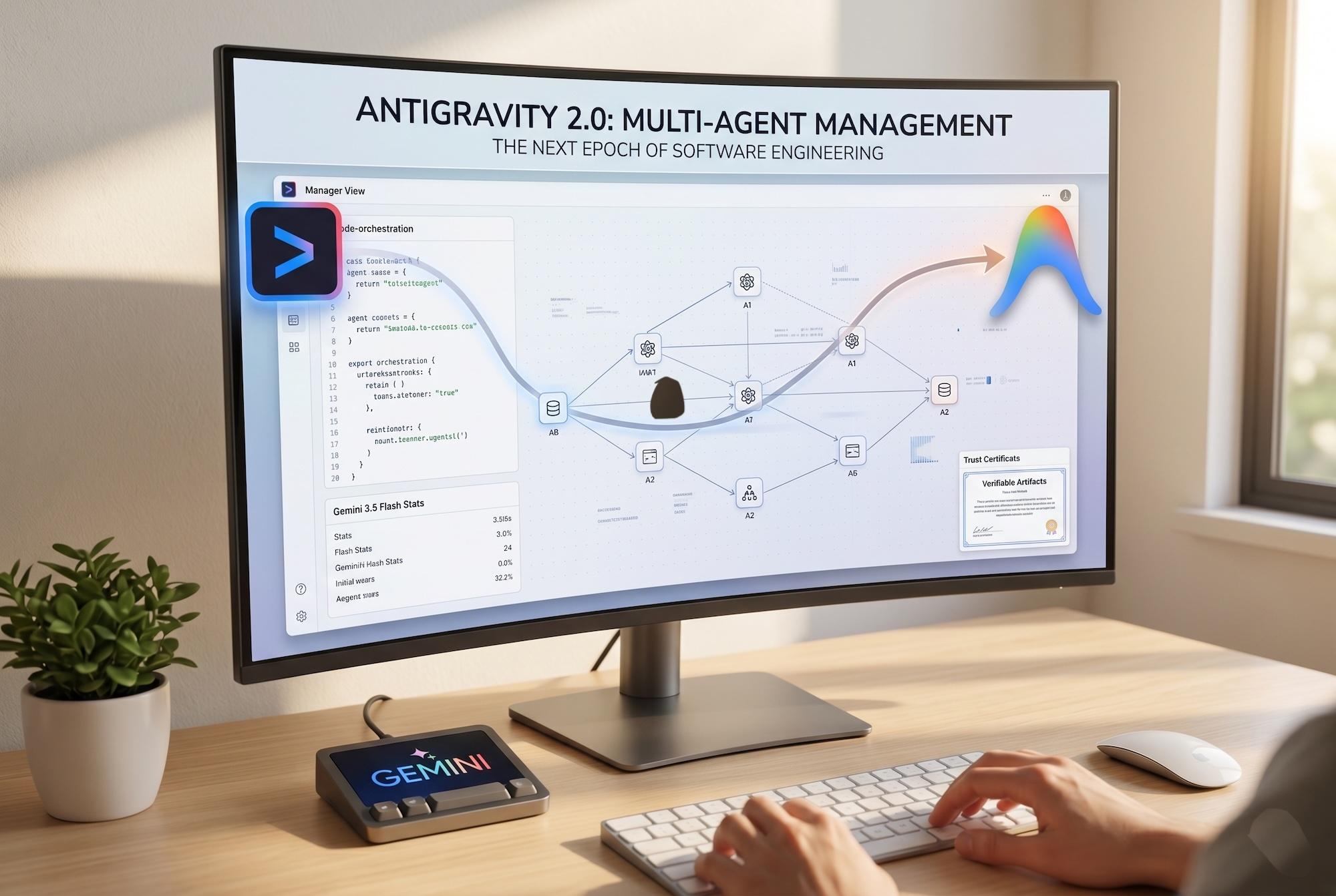
The true magic of the Antigravity 2.0 desktop application happens inside the Manager View. This window acts as a high-level orchestration dashboard. Here, developers act as technical architects rather than typists.
Within the Manager View, you define broad, macro-level objectives for your repository. Each objective spawns an independent, sandboxed agent instance. The interface visually charts these parallel work streams, allowing you to easily track the lifecycle of every running sub-agent.
[ Your Project Repository ]
       │
       ├───► Agent A: Refactor DB Schema ───► (Asynchronous Loop) ───► Generates Artifacts
       ├───► Agent B: Upgrade API v2 ──────► (Asynchronous Loop) ───► Generates Artifacts
       └───► Agent C: Build E2E Tests ─────► (Asynchronous Loop) ───► Requires Human Approval
Put these ideas to work.
From a specific fix to a complete website, we can help you define the scope and get it done.
Discuss my websiteCustom Web & Application DevelopmentShare your goals. We typically reply within 4 hours with questions and practical next steps.
Building Trust via Verifiable "Artifacts"
A primary issue with autonomous AI software development tools is the "black box" dilemma—developers hesitate to trust an AI that alters codebases blindly in the background. Google Antigravity resolves this friction by forcing agents to generate verifiable Artifacts rather than raw, unchecked tool calls.
Before an agent changes a single file or runs a terminal script, it produces an explicit implementation plan. Within the Manager View, developers can inspect these Artifacts, which include:
- Granular step-by-step task lists.
- Visual UI layout mockups.
- System sandboxed web-browser recordings showing how the agent tested a live local endpoint.
- Before-and-after code diffs.
If an action involves high-risk operations—such as installing unchecked packages or executing structural database migrations—the agent pauses its loop and posts an explicit request for human approval within the dashboard. This ensures the human developer maintains ultimate governance over the repository.
The Command Line Powerhouse: Google Antigravity CLI
For developers who prefer to stay entrenched within the terminal, Google introduced the Google Antigravity CLI. This lightweight tool brings the entire Antigravity harness directly to your command line environment.
# Example: Initiating an autonomous debugging agent via the CLI
antigravity run "Identify why the payment webhook is failing on signature validation and apply a fix"
The Google Antigravity CLI utilizes the exact same agent harness, context awareness, and safety constraints as the desktop application. It is highly optimized for headless server environments, automated continuous integration (CI/CD) pipelines, and fast, low-overhead resource execution. Because the CLI shares identical configurations and authentication profiles with the desktop application, you can initiate a complex task in your terminal and immediately track its visual execution graph inside the desktop app.
Expanding Capabilities with Specialized Skills
Out of the box, an Antigravity agent has access to a secure, local Linux sandbox equipped with code execution environments (supporting Bash, Python, and Node.js), public web access via Google Search, and advanced context compaction algorithms to manage sessions up to 1 million tokens.
However, the ecosystem expands drastically via the deployment of targeted "Skills." At Google I/O 2026, various core engineering teams launched tailored skill bundles that compile expert-vetted domain logic:
- Android Skills & CLI: Empowers agents to automatically download the Android SDK, configure gradle environments, and execute end-to-end applications across virtual emulators. It even features an autonomous migration agent capable of translating legacy iOS or React Native code into clean, native Kotlin code in hours.
- Modern Web Guidance Skills: Developed by the Chrome team, this skill interfaces directly with web standards. It injects expert rules regarding performance, web accessibility (a11y), and security protocols, ensuring your coding agents align completely with baseline target browser support.
- Firebase Skills: Provides deep, contextual telemetry data, enabling sub-agents to scaffold, secure, and deploy cloud databases and edge functions rapidly.
Developers looking to build completely customized, proprietary behaviors can leverage the Google Antigravity SDK download package. The SDK gives you full programmatic control over the core agent harness, allowing you to define custom system environments, connect internal corporate APIs, and host the runtime on your own private infrastructure.
Enterprise Security and Cloud Deployment
For large-scale organizations, security is a non-negotiable metric when deploying autonomous AI systems. Google resolves this by bridging local engineering tools with the Gemini Enterprise Agent Platform.
By logging into Antigravity 2.0 with standard corporate Cloud OAuth credentials, developers can link their local workspaces directly to a designated Google Cloud Project ID.
[ Antigravity 2.0 Desktop / CLI ]
               │
      (Cloud OAuth Link)
               ▼
[ Gemini Enterprise Agent Platform ] ──► Regional Model Endpoints & Secure Cloud Boundary
This configuration guarantees that all agent reasoning, tool execution, and code analysis run completely within your secure enterprise cloud boundary. Your proprietary enterprise data is never used to train public base models, fulfilling strict corporate data compliance, regional data sovereignty laws, and strict terms of service guidelines.
Furthermore, you can seamlessly transition projects from prototyping to production. The Google AI Studio project export pipeline allows engineers to start wireframing a full-stack web application in Google AI Studio and export the entire state—including the complete, multi-turn history of the agent's interaction—directly into Google Antigravity 2.0 with a single click.
Summary
In summary, Google Antigravity has officially ushered in the next epoch of software engineering. Rebuilt as a standalone ecosystem, the Antigravity 2.0 desktop application shifts focus away from text input and toward automated multi-agent management. Driven by the incredible velocity and reasoning scores of Gemini 3.5 Flash Antigravity, the platform dominates industry benchmarks like the Terminal-Bench 2.1 AI benchmark.
By utilizing the Antigravity Manager view vs Editor view, developers can smoothly balance direct code writing with high-level asynchronous multi-agent orchestration. Backed by verifiable Artifacts that build human trust, an adaptive Google Antigravity CLI for terminal enthusiasts, and a flexible SDK, this toolkit radically simplifies complex app development. When combined with the enterprise-grade compliance of the Gemini Enterprise Agent Platform and fluid Google AI Studio project export workflows, Google Antigravity cements itself as an indispensable tool for the modern developer.
Frequently Asked Questions (FAQs)
1. Is Google Antigravity a direct fork of Visual Studio Code?
Yes, Google Antigravity utilizes the open-source architecture of VS Code for its foundational text editing layout, but it modifies the core user interface extensively. It alters the environment to prioritize asynchronous agent management and task orchestration over basic text input, introducing a completely custom Agent Manager dashboard.
2. What is the difference between the Editor View and the Manager View in Antigravity 2.0?
The Editor View functions like a traditional IDE with an integrated AI chat panel for focused, line-by-line file adjustments. The Manager View serves as a macro-level mission control dashboard. It allows you to dispatch multiple autonomous sub-agents to work on different bugs or features concurrently across your workspace.
3. What are "Artifacts" within the Google Antigravity platform?
Artifacts are verifiable deliverables created by AI agents to build developer trust. Instead of silently modifying code scripts in the background, an agent generates explicit step-by-step implementation plans, documentation, and browser test recordings. This allows the human architect to review and approve changes before they are committed.
4. Can I use the Google Antigravity CLI without the desktop app?
Absolutely. The Google Antigravity CLI is designed for speed and terminal efficiency, operating as a lightweight command-line harness. It features the exact same agentic intelligence and security safeguards as the desktop application, making it ideal for headless servers and advanced scripts.
5. How does Antigravity ensure enterprise data security?
Through integration with the Gemini Enterprise Agent Platform, users can log in via Cloud OAuth and lock their agent workflows to their secure Google Cloud boundary. This setup ensures that your sensitive data, source code, and internal credentials remain completely under your company's control and are never leaked or used for public training.
Reference Links
- Wikipedia: Google Antigravity IDE Overview
- Google Cloud Developer Blog: I/O 2026 Developer Keynote Tools Summary
- Google Developers Codelabs: Getting Started with Google Antigravity