Mastering n8n Nodes: Building Blocks of Powerful Automation
In the world of workflow automation, n8n nodes serve as the fundamental units that enable connectivity, data transformation, and process orchestration. As a visual automation platform, n8n empowers developers and non-technical users alike to build complex workflows by linking together modular, reusable nodes with minimal code.
This extensive article explores the concept of n8n nodes, their capabilities, how to leverage n8n custom nodes for specific needs, and strategies for designing efficient automation workflows. If you want to deepen your knowledge of n8n and master building scalable automation while streamlining business processes, this guide is your go-to resource.
What are n8n Nodes?
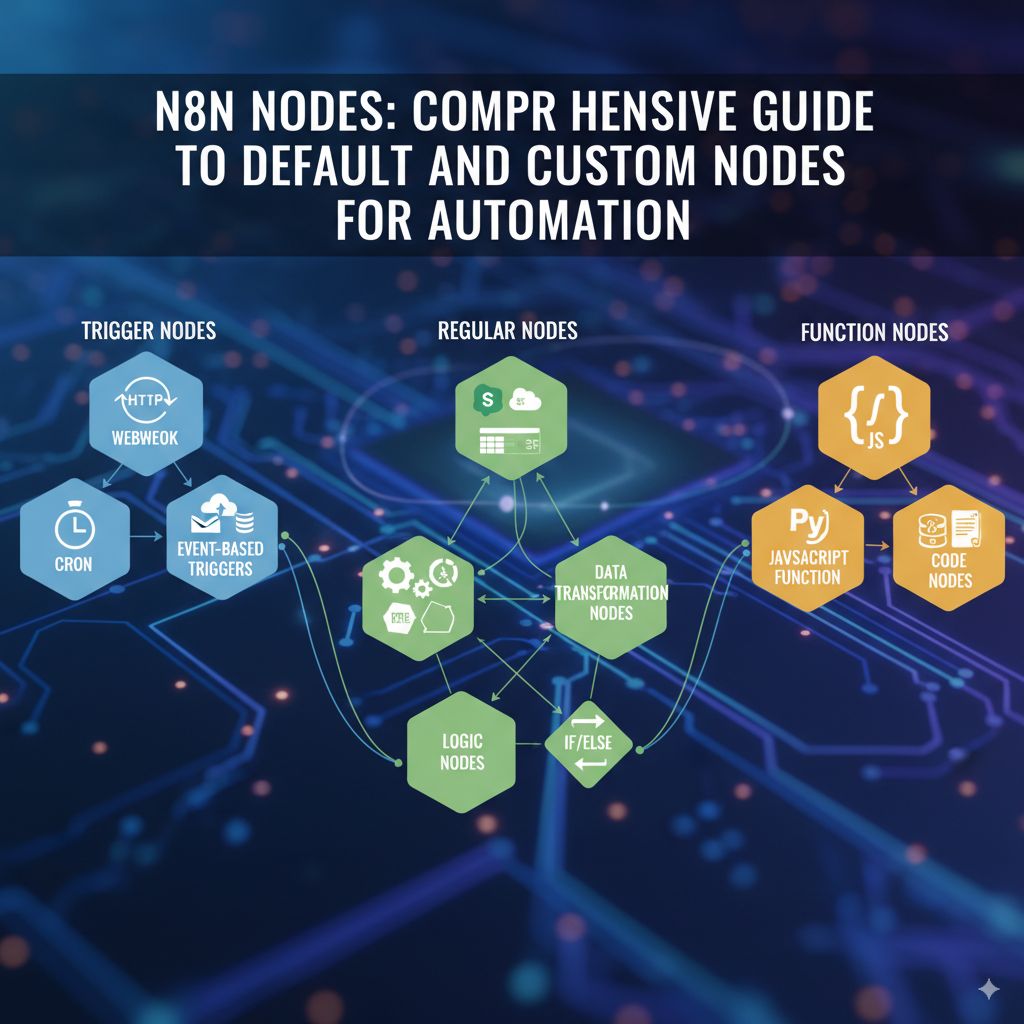
n8n nodes represent individual tasks or actions that perform specific functions within a workflow. Each node connects to others, forming a visual graph defining the automation sequence. Nodes encapsulate integrations, data operations, conditionals, and API calls, enabling the automated transfer and transformation of information across various platforms.
Core Types of n8n Nodes
Trigger Nodes
Trigger nodes start a workflow by listening for events or scheduled runs:
- Webhook: Trigger workflows on HTTP requests.
- Cron: Schedule workflows to run on time intervals.
- Event-based triggers: Listen to emails, file changes, or database updates.
Regular Nodes
- API Call Nodes: Interface with external services like Slack, Google Sheets, Salesforce.
- Data Transformation Nodes: Modify data formats, merge datasets, or filter fields.
- Logic Nodes: Control workflow flow with if/else, switch, loops.
Function Nodes
- JavaScript Function: Customize processing with inline JavaScript code.
- Code Nodes: Run Python, SQL, or scripts for complex logic or integrations.
Benefits of using n8n Nodes
- Flexibility: Combine multiple nodes to build any automation logic.
- Extensibility: Add new nodes or customize existing ones with n8n custom node creation.
- Simplified Visual Programming: Intuitive drag-and-drop interface lowers barriers for automation.
- Scalability: Build workflows from simple to highly complex with nested triggers and custom nodes.
- Interoperability: Connect with thousands of apps and protocols through prebuilt nodes.
How to Create n8n Custom Nodes
While n8n comes with a rich library of standard nodes, custom needs often require specialized functionality. Creating an n8n custom node involves:
- Setting Up Development Environment: Use Node.js and the n8n node development framework.
- Defining Node Metadata: Provide name, icon, description, and input/output parameters.
- Implementing Node Logic: Write execution code, using JavaScript or TypeScript for API calls or processing.
- Packaging and Testing: Bundle your node and test it in your local or cloud n8n instance.
- Publishing: Share custom nodes with team members or the broader n8n community.
This enables new integrations or bespoke automations beyond the default catalog.
Put these ideas to work.
From a specific fix to a complete website, we can help you define the scope and get it done.
Discuss my websiteCustom Web & Application DevelopmentShare your goals. We typically reply within 4 hours with questions and practical next steps.
Best Practices for Efficient n8n Node Workflows
- Minimize unnecessary nodes: Use function nodes to consolidate small tasks and keep workflows clean.
- Leverage Error Handling: Use error trigger nodes and retries to build resilient automation.
- Cache data: Avoid repeated API calls by caching data where possible.
- Use Environment Variables: Securely manage API keys and credentials outside workflows.
- Document workflows: Use node comments and metadata to keep your automation understandable.
Popular n8n Nodes to Master
- HTTP Request Node: Interact with nearly any web API.
- Set Node: Define or modify static and dynamic data fields.
- SplitInBatches Node: Process large datasets efficiently in chunks.
- Merge Node: Combine multiple data streams or results.
- Slack Node: Automate messaging and notifications integrations.
Use Case Example: Automating a Lead Capture Process
- Trigger: Webhook node captures form submissions.
- Data Enrichment: HTTP Request node queries social data APIs.
- Condition: IF node checks lead qualification criteria.
- Notification: Slack node alerts sales team.
- CRM Update: API node sends enriched lead data to Salesforce.
This workflow exemplifies combining out-of-the-box n8n nodes with custom logic.
Frequently Asked Questions (FAQs)
1. What are n8n nodes?
They are modular building blocks in n8n workflows representing actions, integrations, or logic units connected to automate tasks seamlessly.
2. How do I create an n8n custom node?
By following n8n’s node development framework — define metadata, implement execution code, test locally, then deploy.
3. Can non-technical users create n8n workflows?
Yes! The visual drag-and-drop interface and extensive node library make it accessible to non-coders too.
4. How many nodes can I use in one workflow?
There’s no strict limit, but complexity and performance require intelligent construction and optimization.
5. What integrations are available with n8n nodes?
Thousands—spanning cloud services, databases, communication tools, file storage, and more.
Summary
n8n nodes empower users to craft adaptable, scalable automation solutions. With the option to create n8n custom nodes, developers extend functionality, tailoring workflows to ever-evolving business needs. From simple triggers to multi-layered process orchestration, mastering n8n nodes unlocks productivity and innovation under an intuitive, open-source automation environment.
Reference Links