Introduction to n8n: The Open-Source Workflow Automation Powerhouse
In today’s fast-paced digital environment, automation is crucial for efficiency and innovation. n8n stands out as an open-source automation tool designed to empower users in creating complex, customizable workflows with ease. Unlike proprietary automation platforms, n8n offers designers and developers the flexibility to create workflows that integrate with hundreds of applications without vendor lock-in.
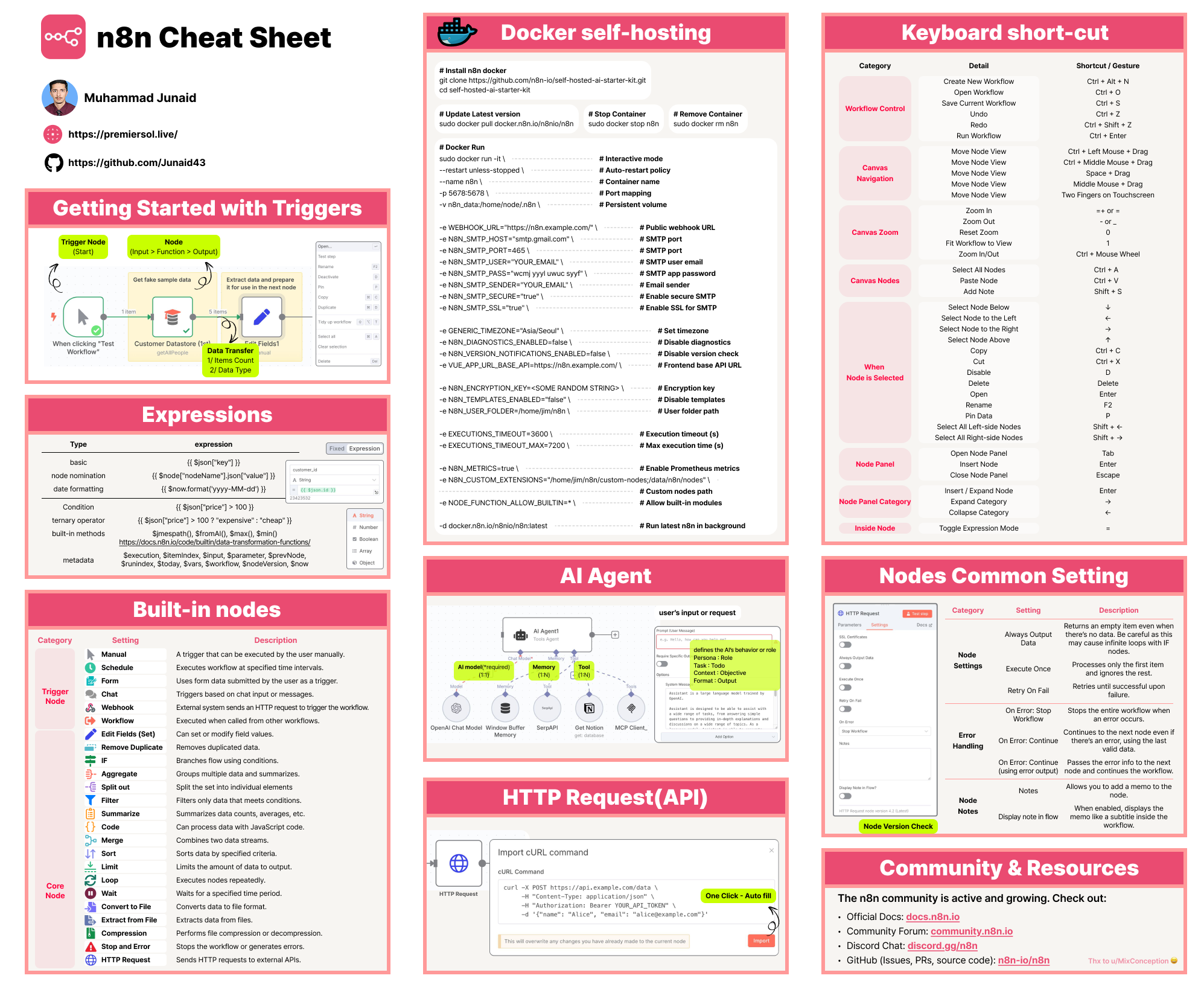
This comprehensive guide will delve deeply into n8n, covering its core concepts such as n8n workflow creation, the role of the n8n agent, automation capabilities, deployment with n8n Docker, and emerging AI functionalities like the n8n AI agent. It also features practical advice with an n8n cheatsheet to help users enhance productivity and integration strategies.
What is n8n?
n8n is a powerful open-source automation platform that allows users to connect different applications and services via customizable workflows. These workflows automate tasks that would traditionally require manual intervention, ranging from sending emails and transforming data to responding to events and integrating complex business processes.
Core Philosophy
- Extendable: Freedom to write custom nodes or integrate third-party APIs.
- Visual Workflow Builder: Drag-and-drop interface for designing automation sequences.
- Self-Hosted or Cloud: Full control with on-premises deployment or usage of the n8n cloud service.
- Data Privacy: Users own their data when self-hosting, an appealing feature for security-conscious businesses.
- Open-Source: Community-driven, allowing rapid feature development and customization.
Understanding n8n Workflow
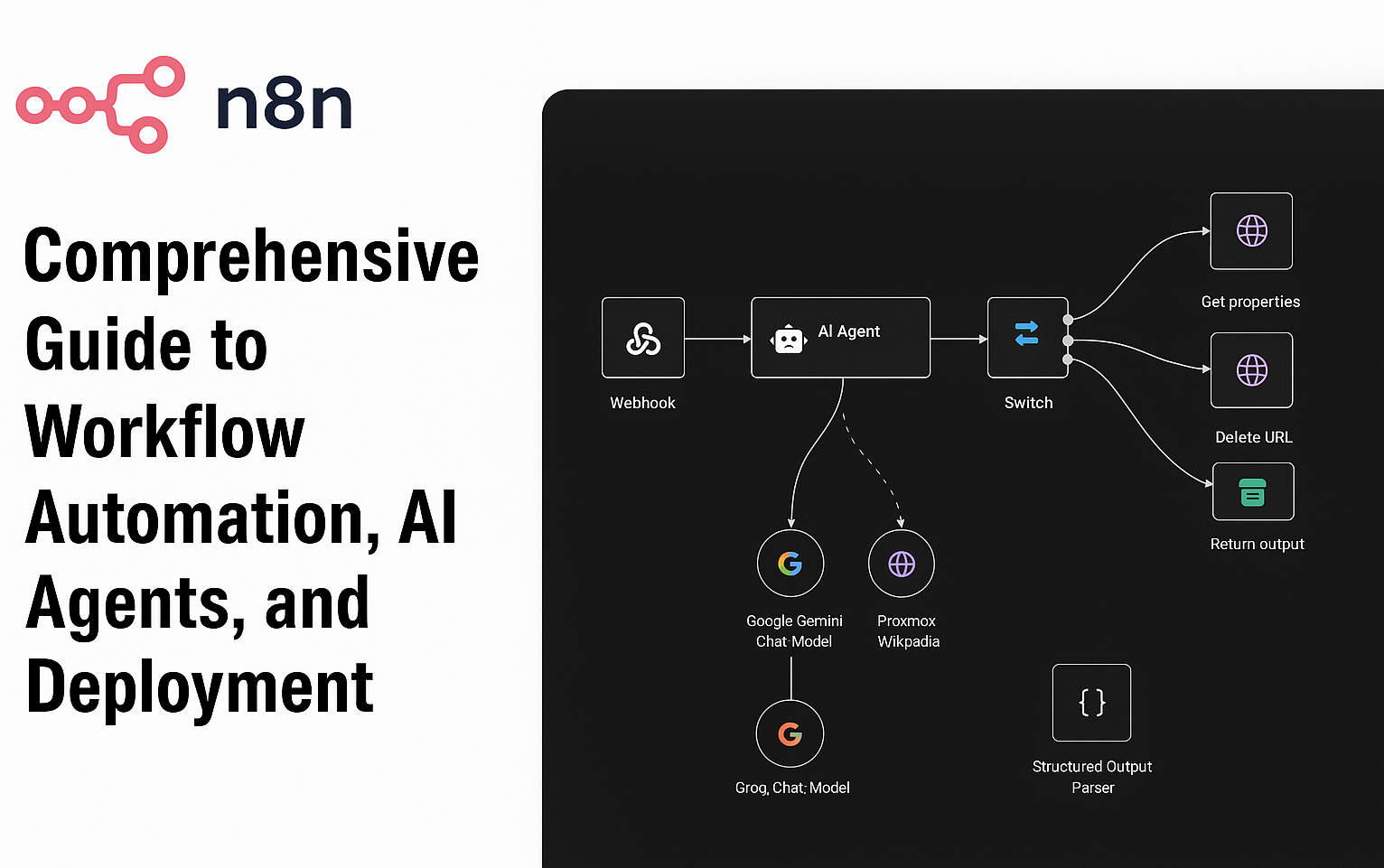
An n8n workflow is a sequence of interconnected steps (nodes) that automate processes. These nodes can trigger actions or react to events, and are linked by data flows.
Components of an n8n Workflow
- Trigger Nodes: Initiate the workflow — e.g., webhook event, schedule, or external signals.
- Action Nodes: Perform actions like query data, send notifications, or manipulate files.
- Control Nodes: Logic nodes such as If, Switch, or Loop that steer flow based on conditions.
- Integration Nodes: Specialized connectors for apps like Slack, Google Sheets, GitHub, and more.
- Function Nodes: Custom JavaScript or code execution for complex processing.
Designing a Workflow
- Start by defining the trigger node relevant to your use case (e.g., webhook or time trigger).
- Chain action nodes that execute business logic or software operations.
- Implement conditional nodes for branching logic.
- Test and debug within the graphical UI.
- Deploy for automatic, real-time execution.
Use Cases for n8n Workflow
- Automated marketing campaigns through CRM integration.
- Incident alerting in DevOps by connecting monitoring tools.
- Customer data syncing between multiple SaaS platforms.
- File conversion and enrichment pipelines.
- Automated report generation and distribution.
The Role of the n8n Agent
An n8n agent is a runtime component that executes workflows in managed or self-hosted setups. It’s responsible for orchestrating the nodes in the workflow and managing execution state, retries, and logs.
Types of n8n Agents
- Local Agent: Runs workflows on the same machine where n8n is hosted, suitable for simple setups.
- Remote Agent: Allows distributed execution, improving scalability and performance by balancing loads across infrastructure.
- AI-Powered n8n Agent: Emerging feature combining AI with workflow automation — interprets natural language instructions and translates them into automated workflows, creating seamless human-AI collaboration.
Agents ensure reliability, fault tolerance, and provide APIs for monitoring and management.
Put these ideas to work.
From a specific fix to a complete website, we can help you define the scope and get it done.
Discuss my websiteCustom Web & Application DevelopmentShare your goals. We typically reply within 4 hours with questions and practical next steps.
n8n Automation: Unlocking Efficiency
n8n automation enables businesses and developers to eliminate repetitive tasks and streamline workflows without writing complex code. Its modular nature facilitates the rapid creation of process automations that can be adapted or extended anytime.
Best Practices for n8n Automation
- Start with clearly defined automation goals.
- Map out process steps visually before building workflows.
- Use environment variables for sensitive data management.
- Test workflows meticulously with varied load conditions.
- Set up alerts for failures and monitor workflow performance.
- Incorporate parallel execution and error handling nodes.
Automation with n8n can span IT, marketing, sales, HR, and beyond, all from a single platform integrating diverse tools.
Deploying n8n with n8n Docker
Leveraging n8n Docker provides an easy and scalable deployment strategy. Docker containers encapsulate all dependencies, making deployments reproducible and consistent across environments.
Steps to Deploy n8n using Docker
- Install Docker on your server or machine.
- Pull the official n8n Docker image (
docker pull n8nio/n8n). - Run the container with environment variables (e.g., database URL, credentials, webhook URL).
- Expose ports securely with firewall rules or reverse proxy.
- Mount volumes for persistent storage (workflows, credentials).
- Automate container restarts with Docker Compose or Kubernetes for high availability.
Docker deployment supports horizontal scaling by adding more container instances behind load balancers.
Exploring n8n AI Agent
The advent of AI integration introduces the n8n AI agent, which combines natural language understanding with workflow automation.
Capabilities of the n8n AI Agent
- Understands human instructions to dynamically build and execute workflows.
- Interacts with AI APIs (ChatGPT, Claude, GPT-4), triggers AI model calls mid-workflow.
- Generates content, summaries, translations, or code snippets integrated into larger automation.
- Provides conversational assistance for non-technical users to automate tasks.
- Supports iterative workflow refinement through conversational feedback.
The n8n AI agent marks a new era of assisted automation, accelerating digital transformation.
n8n Cheatsheet: Quick Reference for Daily Productivity
FAQs
1. What is n8n?
n8n is an open-source, low-code automation platform enabling users to create workflows that connect applications, automate processes, and integrate AI agents.
2. How do I create an n8n workflow?
You create an n8n workflow by selecting a trigger node, adding action nodes for subsequent tasks, and connecting them to define the automation sequence within the n8n UI.
3. What is an n8n agent?
An n8n agent is an AI-powered node capable of autonomous decision-making, interacting with APIs and adapting workflows based on input and context.
4. Can I run n8n on Docker?
Yes, using n8n Docker is a popular, easy method to deploy n8n in isolated, scalable containers for consistent and secure installations.
5. How does n8n AI agent enhance automation?
The n8n AI agent uses natural language processing combined with AI models like GPT to translate user intent into automated workflows and actions, improving accessibility and automation speed.
Summary
n8n is a transformative automation platform ideal for organizations and developers seeking flexibility, transparency, and control over their workflows and integrations. With its powerful n8n workflow design, efficient n8n agent execution, secure deployment via n8n Docker, and advanced AI capabilities through the n8n AI agent, it serves a wide range of automation needs—from simple repetitive task handling to complex multi-application orchestrations. Whether you're starting automation or scaling digital processes, this guide and n8n cheatsheet provide essential knowledge and best practices to unlock the full potential of this dynamic open-source tool.
Reference Links