If you've started researching how to build or rebuild a website in 2026, you've probably run into the same debate everyone else does: Next.js vs WordPress. A developer friend tells you WordPress is outdated. A marketing blog tells you it still powers close to half the internet. Somewhere in between, you just want to know which platform will actually get your business results.
Here's the short version before we get into the details: WordPress still runs roughly 41-43% of all websites on the internet, according to W3Techs, making it the single most-used content management system in the world. If you look up wordpress market share 2026 data yourself, you'll find estimates clustering in that same 41-43% range — still comfortably ahead of every other platform combined, even as growth has visibly plateaued.
This guide walks through the real, practical differences — performance, SEO, cost, security, and day-to-day content editing — using plain language, not developer jargon. By the end, you'll know exactly which platform fits your situation, and what the "best of both worlds" option actually looks like.
What is WordPress, exactly?
WordPress is a content management system (CMS) — software that lets you build and manage a website through a visual dashboard instead of writing code. Launched in 2003 as a blogging tool, it has grown into a full website builder used for everything from personal blogs to enterprise storefronts. You install a theme, add plugins for extra functionality (contact forms, SEO tools, e-commerce via WooCommerce), and edit pages through the Gutenberg block editor. No developer required for day-to-day updates.
What is Next.js, exactly?
Next.js is not a CMS — it's a React framework used to build websites and web applications from the ground up. Instead of installing a theme, developers write custom code that gets compiled into fast, pre-rendered pages served from a global content delivery network (CDN). Next.js 16, the current stable release, ships with Turbopack as its default bundler and full support for React 19.2, giving developers faster builds and finer control over exactly what loads, when, and how. Because there's no built-in editor, Next.js sites are usually paired with a headless CMS — like Sanity, Contentful, or WordPress itself used purely as a data source — so a marketing team can still update content without touching code.
Next.js vs WordPress: the quick-glance comparison
Performance and Core Web Vitals
This is where the wordpress vs next.js for business website conversation usually starts, because speed is the one factor that touches everything else — rankings, conversions, and how visitors feel about your brand in the first three seconds.
A standard WordPress install running a popular theme, a handful of plugins, and shared hosting typically loads in 2.5 to 3.5 seconds. That's not a WordPress flaw exactly — it's the cost of loading a theme, a database query, and plugin scripts on every single request. You can close most of that gap with caching plugins, a CDN, and disciplined plugin management, but it takes ongoing effort, and wordpress core web vitals scores still tend to sit behind a well-built alternative.
Next.js takes a different approach. Pages can be pre-rendered at build time or cached at the edge, so a visitor in another country still gets a page that appears almost instantly, no live database query required. Combined with automatic image optimization and code splitting, this is why Next.js sites consistently post strong scores across all three Core Web Vitals metrics — Largest Contentful Paint (LCP), Interaction to Next Paint (INP), and Cumulative Layout Shift (CLS) — without the ongoing tuning WordPress usually needs.
Anyone who has benchmarked wordpress vs react performance side by side tends to find the same pattern: React-based rendering wins on raw speed almost every time, but the gap narrows considerably once a WordPress site is properly cached, hosted, and trimmed of unnecessary plugins.
If your current site is the WordPress side of this comparison and speed has become the bottleneck, that's a fixable problem before you consider a full platform migration — our website speed optimization service exists specifically for that scenario.
SEO: next.js seo vs wordpress seo
Both platforms can rank well. Google doesn't have a bias toward one codebase over another — it cares about the experience your page delivers. But the path to good SEO looks different on each.
WordPress leans on a mature plugin ecosystem. Tools like Yoast and RankMath handle meta tags, XML sitemaps, and basic schema markup without requiring a developer. That's genuinely useful if you don't have technical resources on hand. The trade-off is that you're working within the plugin's assumptions, and performance overhead from those same plugins can quietly work against the SEO gains they're trying to deliver.
Next.js gives a developer direct, code-level control over every meta tag, canonical URL, structured data snippet, and sitemap entry — there's no plugin acting as a middleman. For content-heavy or highly competitive niches, this matters more than it sounds: you can generate hundreds of precisely optimized landing pages from structured data, something WordPress can technically do but usually struggles to do cleanly at scale.
When agencies argue over the best cms for seo in 2026, the honest answer is that it depends on your team's technical resources, not a single universal winner. The honest takeaway: if your SEO strategy is mostly about publishing good content consistently, WordPress with a solid plugin setup will serve you well. If you're competing in a tight market where technical performance is the tiebreaker, the next.js seo vs wordpress seo gap becomes a real competitive edge.
We cover the fundamentals either way in our SEO services.
Ease of use: who actually edits the content?
This is the category where WordPress still wins outright for most non-technical teams. Log in, click a page, type, publish. The Gutenberg block editor is genuinely good, and there's no learning curve for a marketing team that just needs to swap an image or publish a blog post.
Next.js doesn't include an editor at all — it's a framework, not a CMS. The modern fix is headless architecture: your content team writes in a visual editor (Sanity and Contentful are the most common choices), while the Next.js frontend pulls that content and renders it at speed. Done well, this closes the editing gap almost entirely — your team gets a familiar writing experience, and your visitors get a fast site. Done poorly, it adds a layer of complexity a small team might not need yet.
Security
WordPress's popularity is also its biggest liability. Because it powers such a large share of the web, it's the single largest target for automated attacks — and the vast majority of real-world wordpress security risks trace back to third-party plugins and themes rather than WordPress core itself. A typical site running 20-plus active plugins has 20-plus potential points of failure, each maintained by a different developer on a different update schedule.
Next.js has a smaller attack surface by design. There's no plugin marketplace to audit, no admin login page to brute-force in the traditional WordPress sense, and no database sitting directly behind the public-facing site in most headless setups. That doesn't make a Next.js site immune to every risk — misconfigured APIs and exposed environment variables are real Next.js-specific concerns — but the category of threat is different, and generally narrower.
If you're staying on WordPress, security isn't optional — our guide on WordPress 7.0 security updates and hardening walks through the exact steps to lock a site down properly.
Cost: upfront build vs. long-term ownership
Cost comparisons between these platforms get misleading fast if you only look at day one.
WordPress can go live in days for a few hundred dollars using a quality theme, and hosting starts around $5-$15/month. For a simple brochure site or a tight-budget project, that's hard to beat on paper.
Next.js requires developer time to build, so the upfront cost is meaningfully higher — there's no theme shortcut. But the ongoing bill often tells a different story: no recurring plugin license fees, no managed WordPress hosting premium, and hosting on modern edge platforms that scale efficiently as traffic grows. Over a 2-3 year window, especially for a business site generating real traffic, the total cost of ownership frequently narrows or flips in Next.js's favor — the savings just show up later, not on day one.
The right question isn't “which is cheaper” — it's “cheaper over what timeframe, and for what kind of site.” A five-page brochure site for a local business and a lead-generation engine competing nationally have very different answers. If custom next.js development is on the table for your project, our React & Next.js development service can walk you through realistic numbers for your specific scope.
Put these ideas to work.
From a specific fix to a complete website, we can help you define the scope and get it done.
Discuss my websiteCustom React & Next.js DevelopmentShare your goals. We typically reply within 4 hours with questions and practical next steps.
Scalability and future-proofing
A site that works fine at 5,000 monthly visitors can behave very differently at 50,000. WordPress can absolutely scale — plenty of high-traffic publishers run on it — but it usually requires deliberate work: aggressive caching, a properly sized server or managed host, and ongoing plugin discipline as the site grows.
Next.js was built with scale as a default assumption. Static generation and edge caching mean a traffic spike doesn't automatically translate into a slower site or a bigger server bill. For a business expecting real growth — more products, more content, more markets — that headroom matters more than it seems like it will on launch day.
Headless WordPress + Next.js: the hybrid most teams don't know about
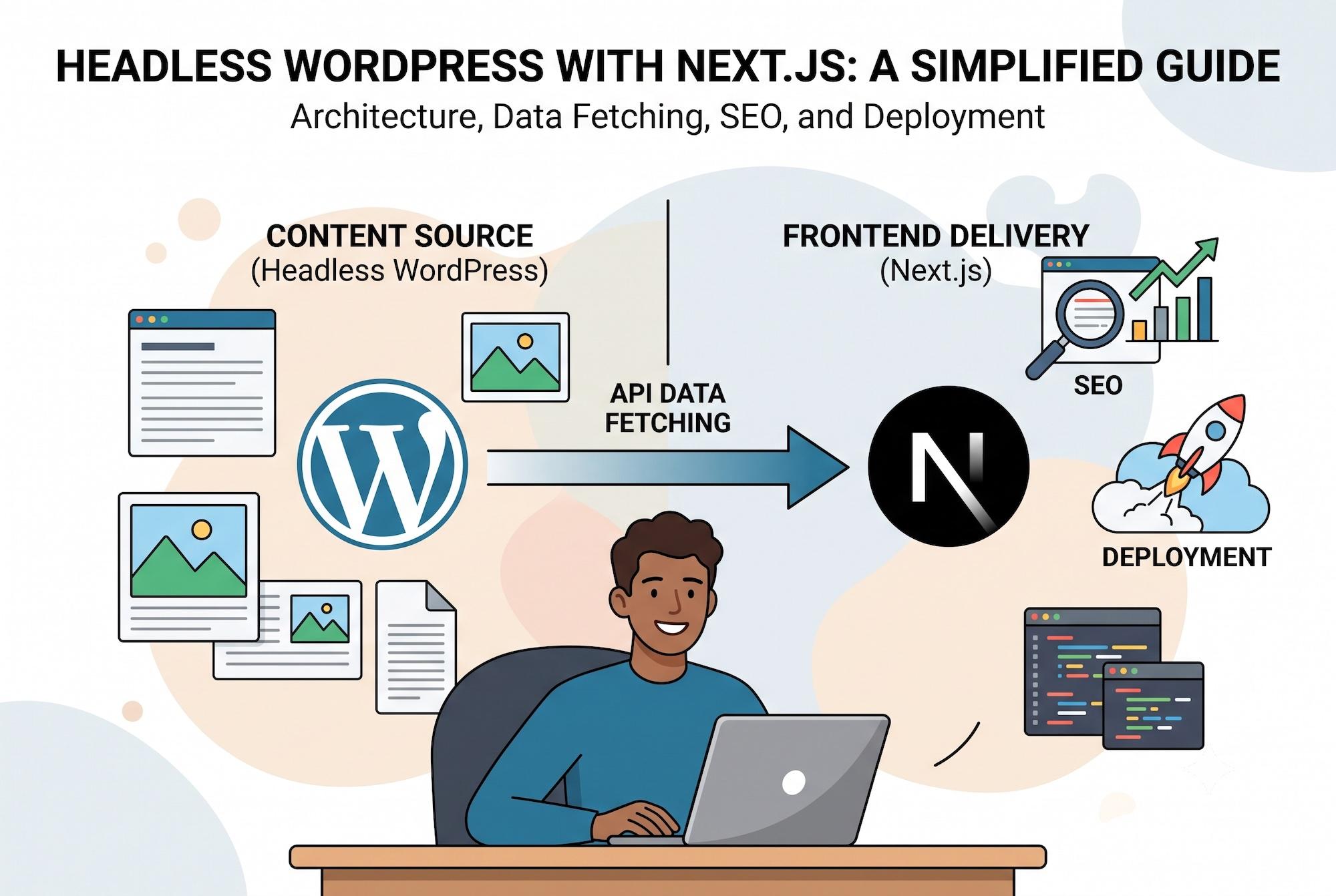
Here's the option that rarely makes it into the “vs.” framing: you don't have to pick a side. In a headless setup, WordPress runs purely as the content backend — your team keeps the familiar Gutenberg editing experience — while Next.js handles everything the visitor actually sees. Content is pulled via the WordPress REST API or WPGraphQL, and the public-facing site is built and rendered the Next.js way: fast, cached, and fully under your technical team's control.
This approach is increasingly common heading into 2026 as more agencies treat “wordpress vs next.js” as a false choice for content-heavy sites, and the same logic extends to next.js for ecommerce projects, where a headless setup can pair a familiar product-management workflow with checkout speeds a stock WooCommerce install rarely matches. It's not the simplest setup, and it does require a developer to build and maintain the connection between the two systems — but for a publisher, a multi-author blog, or a business that refuses to compromise on either editing comfort or page speed, it's often the actual best answer.
So, which should you choose?
Choose WordPress if:
- You need to launch quickly on a modest budget
- Your team has no in-house developer and needs to self-manage content
- You rely on mature plugin functionality — WooCommerce, membership sites, booking systems — that would be expensive to build from scratch
- Your traffic and growth expectations are modest to moderate
Choose Next.js if:
- Page speed and Core Web Vitals directly affect your revenue (e-commerce, lead generation, high-competition SEO)
- You're planning to scale significantly in traffic, content, or functionality
- Security and a minimal attack surface matter because you handle customer data or payments
- You want full, code-level control over technical SEO rather than relying on a plugin
Consider headless WordPress + Next.js if:
- You need WordPress-level editing comfort but can't compromise on speed
- You're running a content-heavy site with multiple authors publishing frequently
- You have (or plan to hire) developer support to maintain the integration
Given how common the wordpress alternatives 2026 conversation has become among growing businesses, the real decision isn't “which platform is objectively better” — it's which one matches where your business is today, and where it's headed in the next two to three years. A site that needs to compete on page one of Google for valuable keywords, integrate with APIs, or generate hundreds of landing pages will outgrow a standard WordPress build faster than most teams expect.
A quick real-world example
We recently rebuilt a proxy-purchasing platform, ProxiesThatWork, as a custom Next.js and React application specifically to solve complex API data-fetching and load-speed problems a templated CMS build couldn't handle cleanly. On the other end of the spectrum, we've also taken WordPress sites that were struggling with sub-20 desktop speed scores and brought them back to a genuinely fast, competitive state through targeted optimization rather than a full rebuild — proof that the right fix depends on the site in front of you, not a blanket rule for every project.
Frequently Asked Questions
Is WordPress still relevant in 2026, or should I avoid it for a new project?
Yes — WordPress remains highly relevant and still powers roughly 41-43% of all websites globally. It's an excellent choice for content-heavy sites, small businesses on a budget, and teams without in-house developers. It's not obsolete; it's simply better suited to some projects than others.
Is Next.js actually better for SEO than WordPress?
Next.js can offer an SEO edge primarily through faster load times and full code-level control over meta tags and structured data, both of which matter for competitive rankings. WordPress with a well-configured SEO plugin still handles the fundamentals well for most businesses — the gap widens as competition and technical complexity increase.
Can I migrate my existing WordPress site to Next.js without losing my rankings?
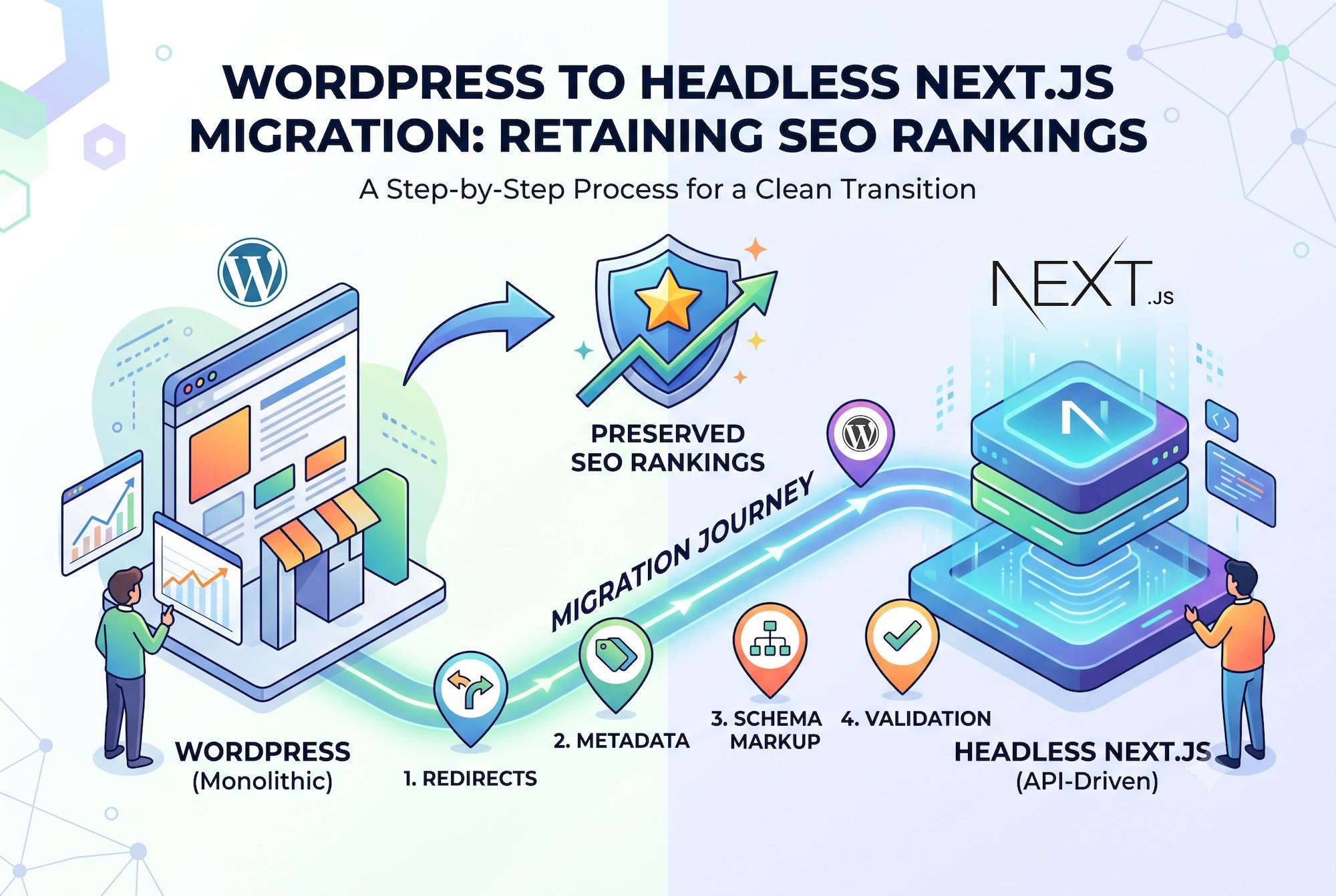
Yes, with careful planning. A migrate wordpress to next.js project needs proper 301 redirects, preserved URL structures where possible, and a like-for-like content and metadata transfer to protect existing search rankings. Timelines typically run from a few weeks to a few months depending on site size and complexity.
How much does a custom Next.js website actually cost compared to WordPress?
WordPress is typically cheaper to launch, often a few hundred to a few thousand dollars using a theme. A custom next.js website development cost usually starts higher due to developer time, but often costs less over 2-3 years once you factor in plugin licenses, managed hosting premiums, and reduced maintenance overhead.
What is headless WordPress, and is it worth the extra complexity?
Headless WordPress means using WordPress purely as a content management backend while a separate frontend — often Next.js — handles everything visitors see. It's worth considering if you need WordPress's editing comfort but can't compromise on speed, though it does require developer support to build and maintain properly.
Summary
WordPress and Next.js aren't really competing for the same job — they're built on different assumptions about how a website should work. WordPress optimizes for ease of editing and fast setup; Next.js optimizes for speed, control, and long-term scalability. Neither is universally “better.” A five-page local business site rarely needs a custom Next.js build, and a fast-scaling e-commerce brand competing on page one of Google rarely thrives on a stock WordPress theme. The right call depends on your budget, your team's technical resources, and how much page speed and SEO control actually matter to your bottom line over the next few years — not just at launch.
Reference Links
- Next.js 16 official release notes — Vercel
- Usage Statistics and Market Share of WordPress — W3Techs
- WordPress.org — official project site
- WordPress Hardening — Developer.WordPress.org
Not sure which platform is right for your business?
Whether you need a lightning-fast custom Next.js and React application or a properly hardened, optimized WordPress site, our team builds and migrates both — and we'll tell you honestly which one fits your goals, budget, and timeline.
Talk to our Next.js & React development team →
Prefer to explore your WordPress options first? See our WordPress website development services or read more on WordPress security best practices.