We have all been there: staring at a "Downloads" folder with 400 items named "Scan_001.pdf," or facing a mountain of competitor research that needs to be summarized by tomorrow morning. This is the "drudgery debt" of modern knowledge work—the hours we lose to organizing, renaming, formatting, and synthesizing before we can actually think.
In our Introduction to Anthropic’s Cowork Tool, we explored the technology behind this new desktop agent. Now, it is time to get practical. How does this actually change your workday?
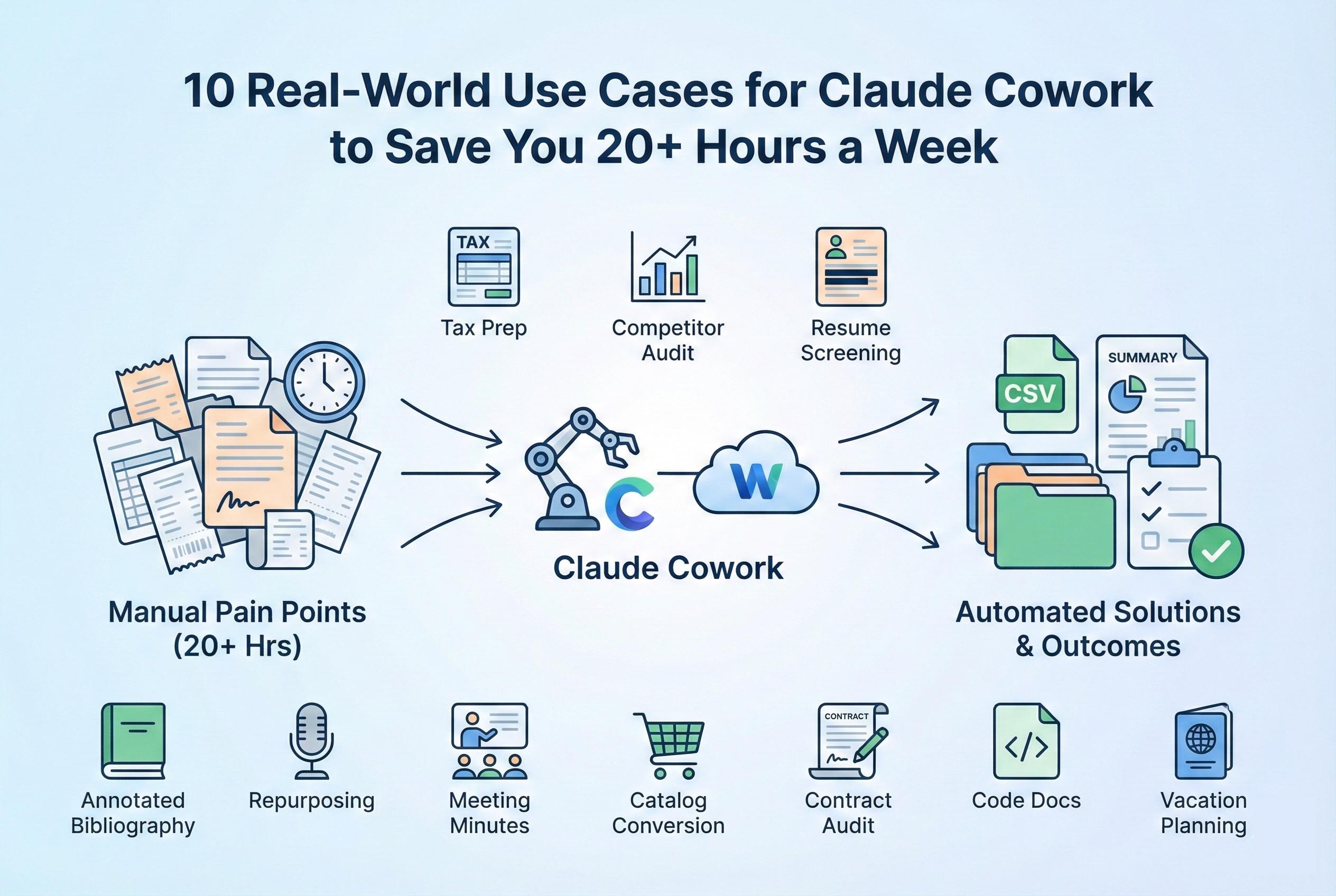
The Anthropic Cowork tool is not just for software engineers. It is a force multiplier for anyone who works with files. By handing off the "grunt work" to an AI agent that lives on your desktop, you can reclaim significant time. Below, we break down 10 specific Claude Cowork examples across different industries that can collectively save you over 20 hours a week.
1. The Freelancer’s Nightmare: Tax Season Prep
The Pain Point: It is the end of the quarter. You have dozens of invoices, receipts, and bank statements scattered across your desktop, Downloads, and random subfolders. They have useless names like "Invoice-Final-FINAL.pdf" or "IMG_2026.jpg."
The Cowork Solution: Instead of opening each file manually, create a "Tax Prep" folder and drop everything in.
- Prompt: "Look at all the files in this folder. Identify which are expenses and which are income. Rename every file to the format 'YYYY-MM-DD_Vendor_Amount'. Then, create a CSV file named 'Q1_Expenses.csv' listing the date, vendor, category, and total amount for each expense."
- Time Saved: 3–5 hours of manual data entry and renaming.
2. The Marketer: Competitor Strategy Audit
The Pain Point: Your boss wants a comprehensive analysis of 5 competitors. You have downloaded their annual reports, whitepapers, and case studies—about 300 pages of reading material.
The Cowork Solution: Move the PDFs into your shared workspace.
- Prompt: "Read these 5 annual reports. Extract the following data points for each company: 'Strategic Focus for 2026', 'Key Risks', and 'Revenue Growth'. Create a comparison matrix in a Markdown table. Then, write a 2-page executive summary highlighting where our company has a competitive advantage."
- Time Saved: 6–8 hours of reading and synthesizing.
3. The HR Manager: Bias-Free Resume Screening
The Pain Point: You have received 100 resumes for a new open role. You want to implement a "blind" hiring process to reduce unconscious bias, but manually redacting names and demographic info is impossible.
The Cowork Solution:
- Prompt: "There are 50 resumes in the 'Applicants' folder. Create a new folder named 'Anonymized'. Copy each resume into that folder, but redact the candidate's name, email, phone number, and university name. Replace the filename with 'Candidate_001', 'Candidate_002', etc. Create a key file linking the ID to the original name, but save that key file in a separate 'Private' folder."
- Time Saved: 4+ hours of manual editing.
4. The Student/Researcher: Annotated Bibliography
The Pain Point: You are writing a thesis and have 20 academic papers to review. You need to create an annotated bibliography and find common themes.
The Cowork Solution: As we touched on in our Step-by-Step Guide to Claude Cowork, the tool excels at document synthesis.
- Prompt: "Analyze these 20 PDF papers. For each paper, write a 150-word abstract summarizing the methodology and conclusion. Then, create a 'Themes' document that groups the papers by their primary argument. Format the output as a standard APA annotated bibliography."
- Time Saved: 10+ hours of reading and formatting.
5. The Content Creator: Repurposing Engine
The Pain Point: You just recorded a 60-minute podcast. Now you need to turn that transcript into a week’s worth of social media content.
The Cowork Solution: Drop the raw transcript text file into your workspace.
- Prompt: "Read this transcript. Identify the 5 most viral/controversial quotes. Write 5 LinkedIn posts, 10 Tweets (threaded), and a 1,000-word SEO blog post based on the key topics discussed. Save each format into its own text file in a 'Social Content' subfolder."
- Time Saved: 3–4 hours of writing and editing.
Put these ideas to work.
From a specific fix to a complete website, we can help you define the scope and get it done.
Discuss my websiteCustom Web & Application DevelopmentShare your goals. We typically reply within 4 hours with questions and practical next steps.
6. The Project Manager: Meeting Minute Synthesis
The Pain Point: You have raw transcripts from 10 different project update meetings (Zoom/Teams captions). You need to find out who promised to do what.
The Cowork Solution:
- Prompt: "Scan these 10 transcripts. Extract every 'Action Item' or promise made by a team member. Create a 'Master Task List' organized by person (e.g., 'Tasks for Sarah', 'Tasks for Mike'). Highlight any deadlines mentioned."
- Time Saved: 2 hours of review.
7. The E-commerce Owner: Catalog Conversion
The Pain Point: A supplier sent you their new product catalog as a PDF. You need to get these 500 products into your Shopify store, which requires a specifically formatted CSV file.
The Cowork Solution:
- Prompt: "Extract product data from 'Supplier_Catalog.pdf'. Create a CSV file that matches the standard Shopify product import format. Map 'Item Name' to 'Title', 'Cost' to 'Variant Price', and 'Description' to 'Body (HTML)'. Note: Add a 20% markup to all prices."
- Time Saved: 5–10 hours of copy-pasting and data entry.
8. The Legal Associate: Contract Audit
The Pain Point: Your company is changing its insurance provider. You need to check 50 vendor contracts to see if they have a specific insurance liability clause.
The Cowork Solution:
- Prompt: "Audit these 50 contracts. Search for the 'Insurance Liability' clause. Create a report listing which contracts have a liability limit of less than $1 Million. Also, flag any contracts that are expiring within the next 90 days."
- Time Saved: 5+ hours of legal review.
9. The Developer: Legacy Code Documentation
The Pain Point: You inherited a folder of Python scripts written by a developer who quit three years ago. There are no comments, and you don't know what the code does.
The Cowork Solution: While Claude Code is better for writing new software, Cowork is great for cleanup.
- Prompt: "Read every .py file in this folder. For every function, add a docstring explaining what the function does based on the logic. Create a 'README.md' file that maps out the dependency structure of these scripts."
- Time Saved: 4–6 hours of code reading.
10. Personal Use: Vacation Planning
The Pain Point: You are planning a group trip. You have a folder full of hotel booking confirmations, flight PDFs, and screenshots of tour ideas sent by friends.
The Cowork Solution:
- Prompt: "Read all these travel documents. Create a chronological 'Itinerary' document. List flight times, hotel check-in/out times, and scheduled tours day-by-day. Calculate the total cost per person based on the receipts."
- Time Saved: 2 hours of planning.
Conclusion: The ROI of Agency
When you look at these Claude Cowork examples, a pattern emerges. The tool isn't doing "creative" work; it is doing connective work. It connects data A to format B. It connects raw files to structured insights.
If you save even 2 hours on each of these tasks, the cumulative effect is massive. For a deeper look at whether this justifies the price tag compared to competitors, read our comparison: Claude Cowork vs. OpenAI Operator: Which AI Agent is Right for You?.
The question isn't "Can I do this myself?" Of course you can. The question is "Should I?" With Claude Cowork, the answer is increasingly "No."
Frequently Asked Questions (FAQs)
1. Can Claude Cowork read scanned PDFs (images)?
Yes. Claude Cowork utilizes Optical Character Recognition (OCR) capabilities. If you drop a scanned receipt or a photo of a document into the folder, it can "read" the text inside the image to extract data, making it perfect for digitization tasks.
2. Is there a limit to how many files it can process at once?
While there is no hard "file count" limit, there is a "context window" limit (the amount of information the AI can hold in its brain at once). For massive tasks (e.g., 500+ large PDFs), it is best to break them into batches. If you give it too much, it might time out or "forget" instructions for the later files.
3. Does Cowork support Excel formulas?
Yes. If you ask it to create a spreadsheet, it doesn't just put in static numbers. You can ask it to "Create an Excel file with a formula in Column D that subtracts Column B from Column C." It understands spreadsheet logic.
4. How accurate is the data extraction?
It is highly accurate but not perfect. For critical tasks like tax preparation or legal review, you should always treat the output as a "Draft." Use the time you saved on data entry to audit the AI's work.
5. Can it handle video or audio files directly?
Currently, Cowork cannot "listen" to audio or "watch" video files natively. You would need to generate a transcript first (using a tool like Whisper or Descript) and then feed the text transcript to Cowork for processing.
Summary
Claude Cowork offers immense value by automating repetitive "grunt work" across various industries. From Freelancers automating tax prep and Marketers synthesizing competitor research, to HR Managers anonymizing resumes and Project Managers generating meeting minutes, the tool turns hours of manual file manipulation into simple prompt-based tasks. By leveraging features like OCR, bulk renaming, and document synthesis, users can reclaim 20+ hours a week, moving from administrative drudgery to high-value strategic work.